Skip to content

Category: english

Horses and datacenters

I used to see horses while driving by. By then it was already an oddity to see horses around there. It was a nice pleasure to see horses running a green field when I was casually driving to Costco. Around Loudoun County, Virginia. Close to Sterling, Herndon, Dulles. Circa 2014.

In the winter they would put these “coats” in the horses to they could keep warm.
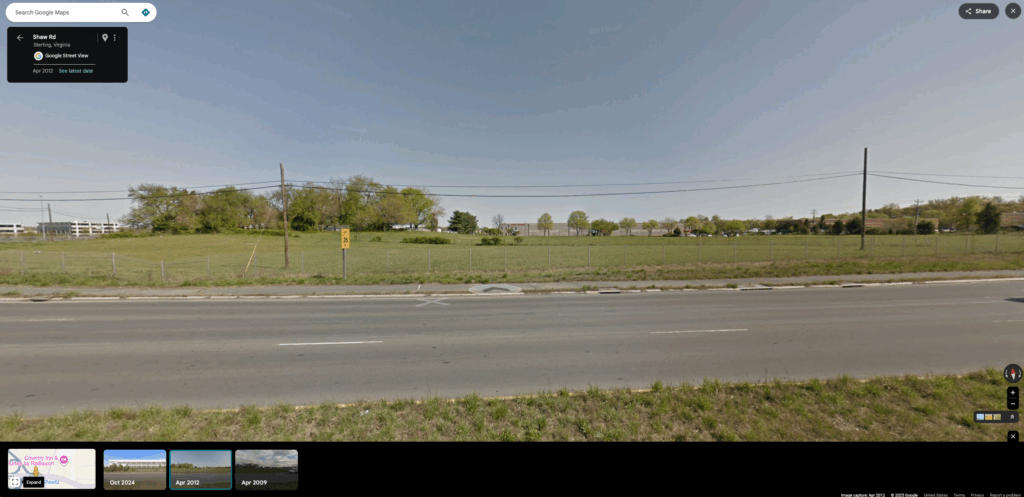
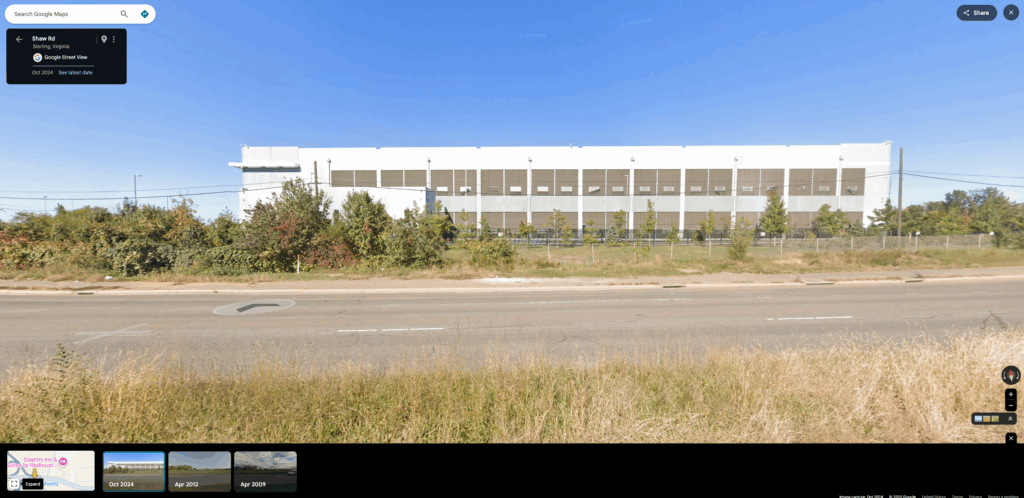
Images from Google Maps


Around 2016, the green field was reduced to make space for a truck parking lot. It was like that for a few years and then very quickly a data center was built.

Definitely not the first data center in that region, but it was incredible how quickly and how many more came. Another one. Another one. This feeling of “hey, there is a data center here now” like they were dropped from the sky. I would miss an entrance, take another road, and whatever I was expecting, it was not there. There was another data center.
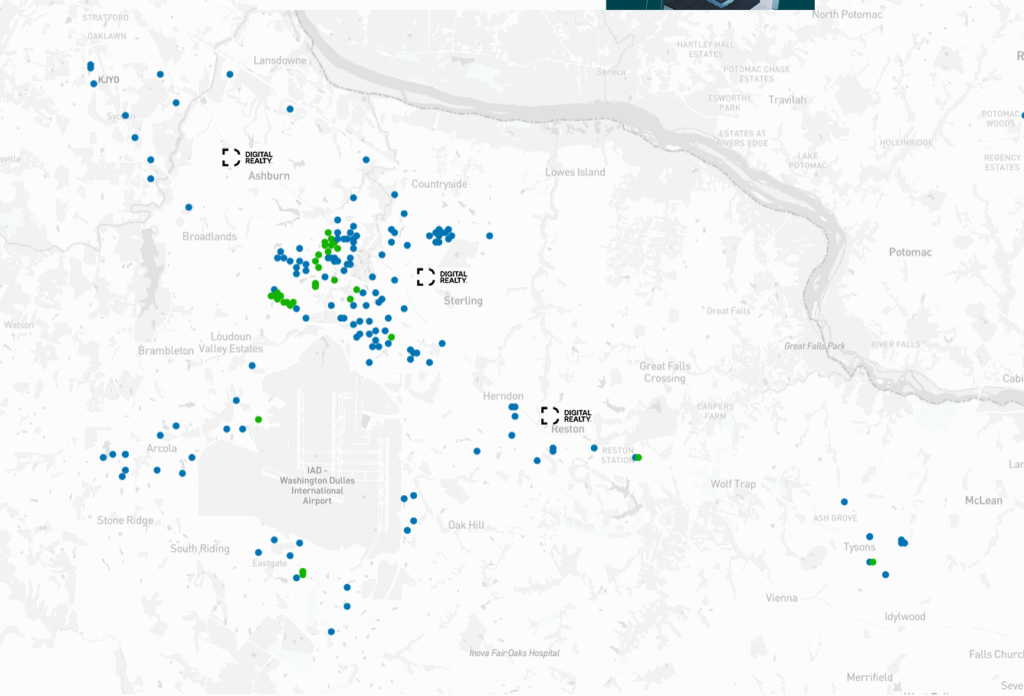
Image from datacentermap.com

On children – Khalil Gibran

Your children are not your children.
They are the sons and daughters of Life’s longing for itself.
They come through you but not from you,
And though they are with you yet they belong not to you.

You may give them your love but not your thoughts,
For they have their own thoughts.
You may house their bodies but not their souls,
For their souls dwell in the house of tomorrow, which you cannot visit, not even in your dreams.

You may strive to be like them, but seek not to make them like you.
For life goes not backward nor tarries with yesterday.
You are the bows from which your children as living arrows are sent forth.
he archer sees the mark upon the path of the infinite, and He bends you with His might that His arrows may go swift and far.
Let your bending in the archer’s hand be for gladness;
For even as He loves the arrow that flies, so He loves also the bow that is stable.

Those panels in Persepolis

Persepolis is an autobiographical graphic novel series by Marjane Satrapi, chronicling her childhood and adolescence in Iran and Austria during and after the Islamic Revolution. You can usually find it between the top 10 best comic books of all times, in any good list.

There is a particular small sequence of panels that’s not particularly important to the plot but really stuck with me. Itt comes back to my mind once in a while.
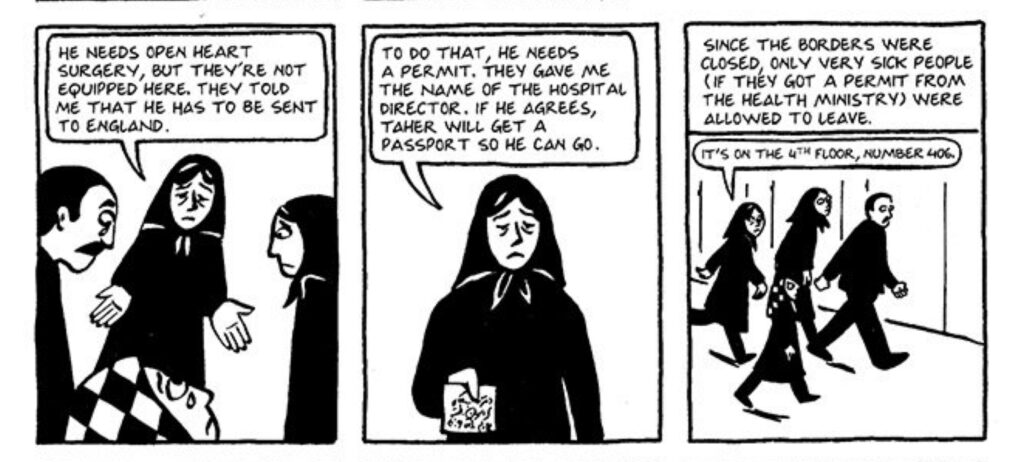
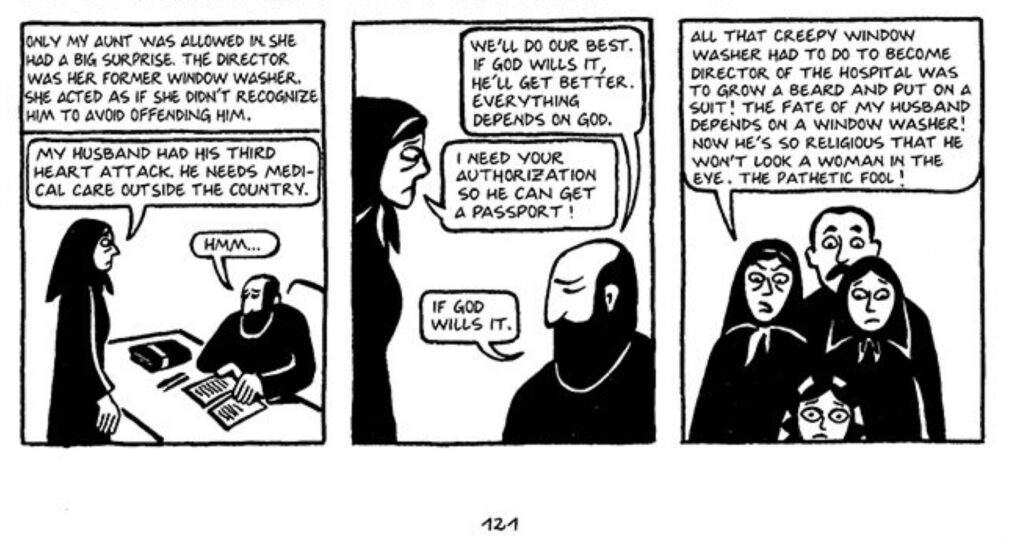
commuting calculations

How much does it cost me per day and per month to drive to work.

home_to_work = 5.4 miles (~8.7 km)
work_to_home = 5.8 miles (~9.3 km)
round_trip = home_to_work + work_to_home = 11.2 miles (18 km)
car_mpg = 14 mpg

gallons_per_trip = round_trip / car_mpg = 0.8 gallons
gallons_price = $3
gas_cost_per_trip = gallons_per_trip * gallons_price = $2.4

parking = $10.50 (after subsidies)

commute_per_day_by_car_cost = parking + gas_cost_per_trip = $12.9
commute_per_month_by_car_cost = commute_per_day_by_car_cost * 20 = $258

Parking is the dominant cost. My car mpg is terrible, however that barely makes a dent on the costs.

three-circle venn diagram coin

$fn=100;

HEIGHT = 5;

CENTER_DISTANCE = 10;
OUTER_RADIUS = 40;
INNER_RADIUS = 30;

module inner_circle(position) {
  rotate([0,0,(360/3)*position])
    translate([CENTER_DISTANCE,0,0])
      cylinder(d=INNER_RADIUS, h=HEIGHT, center=true);
}

module logo() {
  difference() {
    cylinder(d=OUTER_RADIUS, h=HEIGHT-0.01, center=true);
    
    union() {
      intersection() {
        inner_circle(0);
        inner_circle(1);  
      }

    intersection() {
      inner_circle(1);
      inner_circle(2);  
    }

    intersection() {
      inner_circle(0);
      inner_circle(2);  
      }
    }
  }
  
  // piece in the middle
  intersection() {
    inner_circle(0);
    inner_circle(1);
    inner_circle(2);    
  }
}

logo();

half-hexagon in OpenSCAD

height = 5;
radius = 20;

difference() {
  cylinder(height, radius, radius, $fn=6);
  translate([-radius, 0, -height/4]) {            
    cube([radius*2, radius, radius]);
  }
}

It works for these parameters but it needs more work to be really parametric. But hey, it’s my first OpenSCAD thing. I actually exported as .STL and printed it.

I’m back to 3D printing

In 2016 I got a Monoprice Select Mini 3D Printer (model number 15365) for $200 USD. That was incredibly affordable for a 3D printer back then. That printer only gave me disappointments. I was never was able to print anything completely with it. My main problem was adhesion. The only help I got was online forums (there was a really active Facebook group about it). Debugging and trying different solutions without any success was not fun. It ended up just accumulating dust and occupying space in a corner.

Years later I found that my local library had working and calibrated 3d printers that I could just use. Just upload a .stl file and they would just email me when the print was ready. Also, for free. I tried it and it worked really well.

Example of 3D printer available in Fairfax Libraries
My head, 3d printed at my local library. I had my head 3D scanned by MakerBot in 2014.

So I filled some paperwork and donated my Monoprice Select Mini 3D Printer to the library. They also had a lot of other cool technology programs going on. From now on if I need to print something I know I could just use the library. I promise myself I would not mess with 3D printers themselves anymore.

Now in 2025, someone in the neighborhood was looking to donate their Monoprice Maker 2 Ultimate 3D printer. Just when I thought I was out, they pulled me back in. I got it from his hands, bought a spool of PLA Filament and started playing with it.

Monoprice Maker 2 Ultimate 3D printer

Monoprice Maker 2 Ultimate 3D printer technical specifications:

  • Maximum build volume: 200 x 150 x150mm
  • Filament diameter: 1.75mm
  • Nozzle Diameter: 0.4mm
  • Maximum Nozzle Temperature: 250°C
  • Maximum Build Plate Temperature: 100°C
  • Printing Speed: 20 ~ 150 mm/sec
  • Positioning Accuracy: XY Axis: 0.011mm, Z-Axis: 0.0025mm
  • Supported Filament Types: ABS, PLA, PLA Pro, TPU, TPE, PET, Metal fill, Wood fill, etc.
  • Supported Software: Wiibuilder, Cura, Simplify3D, Slic3r, Kisslicer
  • Supported File Formats: .STL, .gcode, .OBJ
  • Print Interface: USB, microSD card
  • Input Power: 24 VDC, 10A
  • AC Adapter Input Power: 100 ~ 240 VAC, 50/60 Hz
  • Maximum Power Consumption: 200 watts
  • Dimensions: 15.0″ x 13.4″ x 16.5″ (380 x 340 x 420 mm)
  • Weight: 33.1 lbs. (15kg)

I started just printing whatever gcode it had on its sdcard. My first prints were just adhesion failures again. That’s when my previous experiences from before were handy. I re-applied painters tape on the print bed, then the prints started to get further and further before failing. Then I got my first complete 3d print.

My first 3d print

Then I started trying with Thingverse stl objects, cutting them in Ultimaker Cura and printing my own gcodes. Here is the catch: the Monoprice Maker 2 Ultimate is a rebranded Weedo F150s. After I configured Cura to use a Weedo F150s the gcodes produced started to print with success.

Gearbox Keychain XL

The printer was modified to have this box with the filament spool over it.

USB cable extension holder.

A Cat phone holder.

Flexi cat.

I have now printed this flexi cat that took almost 6 hours. Do you know what I never got it printing correctly? That 3DBenchy that I always tried to print on my first printer. On this one it always causes the printer to shift layers and fail. Surely with some fine tuning of the parameters I can get it right but the lesson learned here is that sometimes a simple vase is a much better goal. Also, sometimes a 3D printer have more success printing larger objects rather than small ones.