Skip to content

Category: english

Arduino on Ubuntu

Arduinos

My Arduinos arrived yesterday. It’s a programmable open source and hardware device.

To install its software on my Ubuntu 8.10 I need Java installed and some tools that I could get by:

sudo apt-get install avrdude avrdude-doc avrp avrprog binutils-avr gcc-avr

SunSPOT Posters

Some fellows asked for some Sun SPOT posters.

Here it is one that you can use to let people know about Project Sun SPOT.

sunspot poster 500px

Download the PNG with 200 dpi resolution or the SVG vetorial drawing. You can use a tool like Inkscape to open and edit the SVG file. You can change colors, images, texts and anything else.

If you need a poster to a presentation about Sun SPOT you can just print or edit this one:

sunspot poster2 500px

Again, download a 200 pdi PNG file or the SVG vetorial drawing.

Good times with Sun SPOT. 😉

My Free Tileset, version 7

Another version of the my free tileset project with a lot of improvements.

free tileset version 7

Examples of usage:

A hotel I did for helping me in a prototype.

Pixelart hotel

Outdoor scenario. A city.

pixelart city

Another outdoor scenario. A warrior (unpublished character here) walking in a forest.

forest

Changelog:

  • Reorganization of tile positions. Now they are all in a 32×32 grid.
  • Shelf of drinks, two tables and chairs.
  • I placed some characters in this tileset just to help during the creation of prototypes. They should not be really used in maps.
  • Now is possible to create also outdoors scenarios:
    • Two buildings, streets, pedestrian crossing, sidewalks and a manhole cover.
    • A tree, cut tree and a bush.

Game map edition using Tiled

Tiled logo

Tiled is general purpose game map editor, with support of several map formats (XML, JSON), multi plataform and runs installed or from browser, supports plugins to read and write others map formats and all free (under GPL license).

map editor tiles tileset game deveopment

Installing

You can lauch Tiled via Java Web Start or download it’s lastest version zip file. After download it just unzip it and run:

java -jar tiled.jar

Make sure you have at least Java 1.5 installed and configured.

Creating a empty map

After lauching it, open the menu File → New and create a new 10×10 orthogonal map with 32×32 tiles.

Tiled: New Map

Like this one

tiled 10x10 map

Creating a tileset

Now we need to add a tileset to start drawing a map. Let’s use this one

batalhao tileset cc by sa

Save the tileset image above.  Open the menu Tilesets → New Tileset select Reference tileset image and browser to find the tileset image you saved. Keep tile width and height as 32 and tile spacing and margin as 0.

tiled new tileset

Notice a new tab on the Tile palette section.

tiled tileset

Working with layers

Select the first grass tile from the tileset and select the  fill tool (bucket icon) to create a grass field. Use the paint tool (pencil icon) to add some stones and trees at random locations on grass. On the Layers section double click at Layer Name and put a name like “field”.

tiled field

Now let’s create another layer to put the buildings and streets. We can do that by opening the menu Layer → Add Layer or just clicking the new icon on layer’s section. Let’s call it “city”.

Now build your city by selecting tiles on the palette and using the paint tool. There’s tiles for horizontal and vertical street and all kinds of intersection. For the building you can click and drag in the palette to select multiple tiles at once.

tiled city

Saving

You can save the map as tmx (XML Tiled map file) , JSON, LUA, wlk, map (Mappy) or export it as a image. There’s some options accessible on the Edit → Preferences menu like use base-64  gziped encoding.

Thanks to Adam Turk and Bjørn Lindeijer for developing that great project.

In a next post I want to show how to integrate this with a Java/JavaFX game.

JavaFX, easy use of tiles

Continuing my little JavaFX framework for game development, right now focused on use those tiles I’m drawing and posting here in my blog. This framework will be a group of classes for simplify and hide some complexities of common game development. Right now I wrote just a few of them.

Use

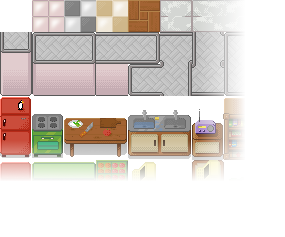
We create a tileset from the files.png file that way

var tileset = Tileset {
    cols: 15 rows: 10 height: 32 width: 32
    image: Image {
        url: "{__DIR__}tiles.png"
    }
}
tiles

Tileset are orthogonal, distributed into a grid of cols columns and rows rows. Each tile have dimensions height x width.

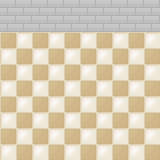
A Tileset is used into a Tilemap

var bg = Tilemap {
    set:tileset cols:5 rows:5
    map: [8,8,8,8,8,3,3,3,3,3,3,3,3,3,3,3,3,3,3,3,3,3,3,3,3]
}

That shows
bg tilemap

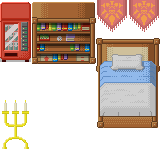
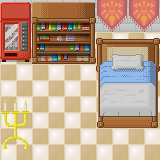
Each number in the map represents a tile in the tilemap. Number 0 means the first tile at the upper left corner, numbers keep growing from left to right columns, from top to bottom rows.

Another example

var things = Tilemap {
    set:tileset cols:5 rows:5
    map: [80,55,56,145,145,96,71,72,61,62,0,0,0,77,78,122,0,0,93,94,138,0,0,0,0]
}
things tileset

A tilemap can also contains more than one layer

var room = Tilemap {
    set:tileset cols:5 rows:5 layers:2
    map: [
        [8,8,8,8,8,3,3,3,3,3,3,3,3,3,3,3,3,3,3,3,3,3,3,3,3],
        [80,55,56,145,145,96,71,72,61,62,0,0,0,77,78,122,0,0,93,94,138,0,0,0,0]
    ]
}
tileroom

Implementation

The Tileset class basically stores a Image and a collection of Rectangle2D objects, for be used as viewports in ImageView classes.

import javafx.scene.image.ImageView;
import javafx.scene.image.Image;
import javafx.geometry.Rectangle2D;

public class Tileset {
    public-init var      image: Image;
    public-init var      width: Integer = 32;
    public-init var     height: Integer = 32;
    public-init var       rows: Integer = 10;
    public-init var       cols: Integer = 15;
    protected   var       tile: Rectangle2D[];

    init {
        tile =  for (row in [0..rows]) {
            for (col in [0..cols]) {
                Rectangle2D{
                    minX: col * width, minY: row * height
                    height: width, width: height
                }
            }
        }
    }
}

The Tilemap is a CustomNode with a Group of ImageViews in a grid. The grid is mounted by iterating over the map as many layers was defined.

public class Tilemap extends CustomNode {
    public-init var   rows: Integer = 10;
    public-init var   cols: Integer = 10;
    public-init var    set: Tileset;
    public-init var layers: Integer = 1;
    public-init var    map: Integer[];

    public override function create(): Node {
        var tilesperlayer = rows * cols;
        return Group {
            content:
                for (layer in [0..layers]) {
                    for (row in [0..rows-1]) {
                        for (col in [0..cols-1]) {
                            ImageView {
                                image: set.image x: col * set.width y: row * set.height
                                viewport: set.tile[map[tilesperlayer*layer + row*rows+col]]
                            }
                        }
                    }
                }
        };
    }
}

Next steps

  • Integrate to a map editor
  • Support some XML map format
  • Sprite classes for animation
  • Integrate those collision detection classes I posted before

Download

Easily encrypt files with Gnu Privacy Guard

gnupg logo

Gpg is the OpenPGP part of the GNU Privacy Guard (GnuPG). It is a tool to provide digital encryption and signing services  using  the  OpenPGP  standard.

To easily encrypt a file called mydocs use:

gpg -c mydocs

You’ll be propted twice for a password, after that a encrypted file called mydocs.gpg is created. You can send this file to your it’s destine and send the password using some secure way. In the other side to decrypt the file:

gpg mydocs.gpg

That’s a very simple use of this tool, you can do much more.

Reading Twitter with JavaFX

twitter bird

Twitter is a social network and micro-blogging service that allow you to create and read tweets, 140 characters text-based posts. It’s becoming a popular tool to keep in touch with your friends, coworkers, bloggers, etc. Here we’ll create a very simple application that show us tweets related with a given word.

Twitter offers a very simple and powerfull REST API which supports XML, JSON, and the RSS and Atom formats. As we are aiming just to read tweets we’ll use just the Search API.

We do that in three steps:

  1. Query Tweets
  2. Parser the Atom result
  3. Show tweets into a GUI

Let’s see them in the order of dependence beetween them.

Displaying a Tweet

var gradient = LinearGradient {
    startX: 0.0,
    startY: 0.0,
    endX: 0.0,
    endY: 150.0
    proportional: false
    stops: [Stop {offset: 0.0 color: Color.DARKGRAY },
        Stop { offset: 1.0 color: Color.BLACK }]
}

public class Tweet extends CustomNode {
    public var image: Image;
    public var username: String;
    public var message: String;
    public override function create(): Node {
        var txt = Text {
            x: 65  y: 35 wrappingWidth: 150 fill: Color.WHITE
            content: "{message}"
        }
        return Group {
            content: [
                Rectangle {
                    width: 220 height: txt.boundsInLocal.height + 40
                    arcHeight: 10 arcWidth: 10 fill: gradient
                },
                ImageView {
                    x: 5 y: 20 image: image
                },
                Text {
                    x: 65  y: 20 fill: Color.BLACK content: "{username} said"
                },
                txt
            ]
        };
    }
}

For example, this tweet would become:

tweet example

Parsing ATOM result

In my last post about JavaFX I showed how to parse XML documents (and make sandwiches) with JavaFX. Here we’ll use the Atom format, but use any other would be almost the same. Parsing XML or JSON documents with JavaFX is both very simple using the javafx.data.pull.PullParser class.

A query output is a Atom XML document with several information. We are interested only in the fields that holds the avatar image, the message and the user name.

var tweets = VBox {}
def parser = PullParser {
    var avatar;
    var firstname;
    var text;
    documentType: PullParser.XML;

    onEvent: function(event: Event) {
        if(event.type == PullParser.START_ELEMENT){
            if(event.qname.name.equals("link")){
                if(event.getAttributeValue(QName{name: "rel"}) == "image"){
                    avatar = event.getAttributeValue(QName{name:"href"});
                }
            }
        }

        if(event.type == PullParser.END_ELEMENT) {
            if(event.qname.name == "title"){
                    text = event.text;
            }
            if((event.qname.name == "name")and(event.level==3)){
                var names: String[] = event.text.split(" ");
                firstname = names[0];
                insert Tweet {
                        image: Image {
                            url: avatar
                        }
                        message: text
                        username: firstname
                    } into tweets.content;
            }
        }
    }
}

Querying Tweets

We can get Atom results through url queries like that:

Notice that queries should be URL encoded. We will use a additional parameters &rpp=4 to receive only 4 results per page. To know more about search queries read the Search API Documentation. We get these results as InputStreams making asynchronous HTTP requests using the javafx.io.http.HttpRequest class, which it’s perfect to invoke RESTful Web Services.

word = "Beatles";
var request = HttpRequest {
    location: "http://search.twitter.com/search.atom?q={word}&rpp=4";
    onInput: function(stream: java.io.InputStream) {
        parser.input = stream;
        parser.parse();
    }
}
request.enqueue();

Conclusion

Here is the application running for the word “House”.

twitter with javafx

Is not a complete Twitter client, as it’s not intended to be, but can show you how to handle a simple asynchronous call and handle Twitter documents. There’s already a few beta JavaFX Twitter clients like Tweetbox and Twitterfx and certanly others will appears.

Download

Sources and Netbeans project, fxtwitter.tar.bz2.