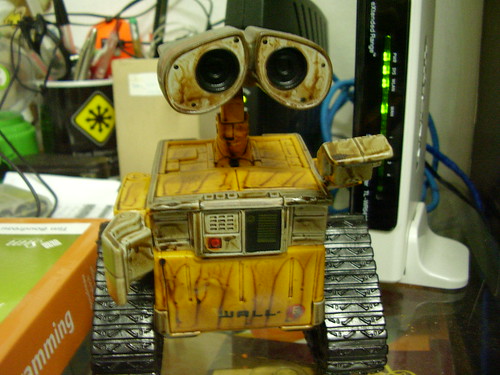
A new toy in my desk. One of many I gave myself in the children’s day this year.
Put on your sunday clothes!
[youtube]iodViuPZBz4[/youtube]
A new toy in my desk. One of many I gave myself in the children’s day this year.
Put on your sunday clothes!
[youtube]iodViuPZBz4[/youtube]
Another impressive talk from TED Ideas Worth Spreading about bonobos monkeys, abilities, language and culture.
Description: Savage-Rumbaugh’s work with bonobo apes, which can understand spoken language and learn tasks by watching, forces the audience to rethink how much of what a species can do is determined by biology — and how much by cultural exposure.
A simple Java servlet that looks for some well known databases drivers.
import java.io.IOException;
import java.io.PrintWriter;
import javax.servlet.ServletException;
import javax.servlet.http.HttpServlet;
import javax.servlet.http.HttpServletRequest;
import javax.servlet.http.HttpServletResponse;

public class TestDB extends HttpServlet {
    public void tryDataBase(String name, String url, PrintWriter out){
        String fail = "fail";
        String sucess = "Ok";
        out.println("Looking for the "+ name +" driver...");
        try {
            Class.forName(url);
            out.println(sucess);
        } catch (ClassNotFoundException ex) {
            out.println(fail);
        }
        out.println("
");
    }

    @Override
    protected void doGet(HttpServletRequest request, HttpServletResponse response)
    throws ServletException, IOException {
        response.setContentType("text/html;charset=UTF-8");
        PrintWriter out = response.getWriter();
        try {
            out.println("Looking for databases");
            out.println("
Looking for databases
");

            tryDataBase("MySQL", "com.mysql.jdbc.Driver", out);
            tryDataBase("Derby", "org.apache.derby.jdbc.EmbeddedDriver", out);
            tryDataBase("PostgreSQL", "org.postgresql.Driver", out);
            tryDataBase("Oracle", "oracle. jdbc.driver.OracleDriver", out);
            tryDataBase("SQLite", "org.sqlite.JDBC", out);

            out.println("");
        } finally {
            out.close();
        }
    }

}
When compiling and running this make sure you put your drivers in your classpath.
A example of output:

Take a look in this interesting post of Dan MacAskill, CEO of SmugMug, about his experiences on OpenSolaris servers with ZFS and MySQL.
SmugMug is a digital photo sharing website, focused on professional photographers. The site is also famous for storing huge amounts of data (photos) using local filesystems and the Amazon S3 service. Just on S3 are 100 800 terabytes of data (according to this and this).
Very interesting pots because he tels in details his experieces over some diferents points of view.
I created some illustrative and simple implementations of common Unix commands. For those who are familiar with Unix-like systems them make easier to understand Java. For those who are familiar with Java them make easier to understand Unix-like systems. 🙂
1. PWD
The first one is pwd that show the current working directory.
public class Jpwd {
    public static void main(String[] args) {
        String pwd = System.getProperty("user.dir");
        System.out.println(pwd);
    }
}
Running this at /home/silveira directory gives us as output:
$ java Jpwd
/home/silveira
1. CAT
The command cat is usually utilized for displaying files.
import java.io.BufferedReader;
import java.io.FileNotFoundException;
import java.io.FileReader;
import java.io.IOException;

public class Jcat {
    public static void main(String[] args) {
        if(args.length==1){
            try {
                FileReader fileReader = new FileReader(args[0]);
                BufferedReader in = new BufferedReader(fileReader);
                String line;
                while((line = in.readLine())!= null){
                    System.out.println(line);
                }
            } catch (FileNotFoundException ex) {
                System.out.println(args[0]+", file not found.");
            }
            catch (IOException ex) {
                System.out.println(args[0]+", input/output error.");
            }
        }
    }
}
$ java Jcat /etc/timezone
America/Fortaleza
3. LS
The command ls is to list files. The File API (java.io.File) is very flexible and portable, but in this example I want just list files and directories of the current directory.
import java.io.File;

public class Jls {
    public static void main(String[] args) {
        File dir = new File(System.getProperty("user.dir"));
        String childs[] = dir.list();
        for(String child: childs){
            System.out.println(child);
        }
    }
}
Usage:
$ java Jpwd
/home/silveira/example
$ java Jls
directoryA
fileA
.somefile
4. CD
The cd command changes the current working directory.
import java.io.File;

public class Jcd {
    public static void main(String[] args) {
        if(args.length==1){
            File dir = new File(args[0]);
            if(dir.isDirectory()==true) {
                System.setProperty("user.dir", dir.getAbsolutePath());
            } else {
                System.out.println(args[0] + "is not a directory.");
            }
        }
    }
}
Usage:
$ java Jpwd
/home/silveira
$ java Jcd /tmp
$ java Jpwd
/tmp
Do you know the toy Mr. Potato Head? Now meet the Java Potato.
[youtube]6NrUdp5XX_o[/youtube]
Duke images here from previous dukes I posted and other images from Open Clipart Project.
Java Web Start:

The code:
package dukepotato;

import javafx.application.Frame;
import javafx.application.Stage;
import javafx.scene.CustomNode;
import javafx.scene.Node;
import javafx.scene.Group;
import javafx.input.MouseEvent;
import javafx.scene.geometry.Circle;
import javafx.scene.paint.Color;
import javafx.scene.image.ImageView;
import javafx.scene.image.Image;

public class Img extends ImageView{
    public  attribute content: Node[];
    public  attribute src: String;

    private attribute endX = 0.0;
    private attribute endY = 0.0;
    private attribute startX = 0.0;
    private attribute startY = 0.0;

    override attribute translateX = bind endX;
    override attribute translateY = bind endY;
    override attribute blocksMouse = true;

    init {
        image = Image {
            url: "{__DIR__}/{src}"
        }
    }

    override attribute onMousePressed = function(e:MouseEvent):Void {
        startX = e.getDragX()-endX;
        startY = e.getDragY()-endY;
    }

    override attribute onMouseDragged = function(e:MouseEvent):Void {
        endX = e.getDragX()-startX;
        endY = e.getDragY()-startY;
    }
}

var dukesimages = ["duke1.png", "duke2.png", "duke3.png", "duke4.png"];
var dukes = for (image in dukesimages){
    Image {
        url: "{__DIR__}/{image}"
    }
}
var index = 0;
var duke = ImageView {
    x: 200, y:170
    image: bind dukes[index];
    onMouseClicked: function( e: MouseEvent ):Void {
        index = (index + 1) mod sizeof dukesimages;
    }
}

var hat = Img { src: "hat.png", x: 370 }
var partyhat = Img { src: "party_hat.png", x: 160, y: 5 }
var cap = Img { src: "cap.png", x: 230, y: 10 }
var cake = Img { src: "cake.png", x: 526, y: 190 }
var glove = Img { src: "glove.png", x: 338, y: 363 }
var baseball = Img { src: "baseball.png", x: 548, y:373 }
var pencil = Img { src: "pencil.png", x: 451, y: 365 }
var camera = Img { src: "camera.png", x: 125, y: 380 }
var coffee = Img { src: "coffee.png", x: 541, y: 114 }
var burger = Img { src: "burger.png", x: 542, y: 282 }
var diamond = Img { src: "diamond.png", x: 243, y: 383 }
var pliers = Img { src: "pliers.png", x: 20, y: 368 }
var rubikcube = Img { src : "rubikcube.png", x: 37, y: 295 }
var syringe = Img { src: "syringe.png", x: 35, y: 245 }
var hourglass = Img { src: "hourglass.png", x: 35, y: 127 }
var adventurehat = Img { src: "adventurehat.png", x: 8, y:30 }
var tie = Img { src: "tie.png", x: 547, y:35 }

Frame {
    title: "Duke Potato"
    width: 640
    height: 480
    closeAction: function() {
        java.lang.System.exit( 0 );
    }
    visible: true

    stage: Stage {
        content: [duke, hat, partyhat, cake, adventurehat, cap, glove,
            baseball, pencil, camera, coffee, burger, diamond,
            pliers, rubikcube, syringe, hourglass, tie]
    }
}
Download a package with the NetBeans project, sources, libraries and images, DukePotato.tar.gz.
This script create a thumbnail with width 100 of each png file in the actual directory.
#!/bin/sh
for i in *.png
do
	echo "convert -thumbnail 100 $i $i"
	convert -thumbnail 100 $i $i
done
[youtube:http://youtube.com/watch?v=eO9oseiCTdk]
Description from video:
A robotic fish developed by scientists from Essex University is put through its paces in a special tank at the London Aquarium. It works via sensors and has autonomous navigational control.
Should be hard creating robotics to work underwater…
More Dukes we’re creating to use in the 6th CEJUG’s birthday.
The first one is a Duke intented to be used as a badge. We should tie string in both hands and transform it in a badge for the event.

Original SVG version: duke_badge.svg
The second is a general purpouse Duke sign. You can print them in blank and use a brush to write on it.

Original SVG version: duke_sign.svg
Some Sun student datasheet posters. Click on the images to download them.


Or in those links.

