I started to make several small JavaFX game demos. I’m doing that to fell where JavaFX is good to make this sort of game and what patterns would be frequently needed to implement, where I will place a little framework for fast development of simple casual games. What I’m calling now just ‘GameFX’. My first experiment was to creating a side scrolling animation that’s is usefull to create the parallax effect in side scrolling games. For that I created the class Slidding. You create an Slidding with a set of nodes and they will slide from right to left and when a node reaches the left side it back to the right side.
You create a Slidding with a list of Nodes at content, a clock (that will determine the speed of that animation) and a width. If you don’t provide a width, the slidding will do the best effort to determine one. You can use this approach to create more complex scenarios, using more Slidding groups.
This is a example of that:
import javafx.application.*;
import javafx.animation.*;
import javafx.scene.geometry.*;
import javafx.scene.paint.*;
import javafx.scene.*;

import gamefx.Slidding;

var SCREENW = 500;
var SCREENH = 400;

/* the sky is a light blue rectangle */
var sky = Rectangle {
    width: SCREENW, height: SCREENH
    fill: LinearGradient {
        startX: 0.0 , startY: 0.0
        endX: 0.0, endY: 1.0
        proportional: true
        stops: [
            Stop { offset: 0.0 color: Color.LIGHTBLUE },
            Stop { offset: 0.7 color: Color.LIGHTYELLOW },
            Stop { offset: 1.0 color: Color.YELLOW }
        ]
    }
}

/* the ground is a olive rectangle */
var ground = Rectangle {
    translateY: 300
    width: 500, height: 100
    fill: LinearGradient {
        startX: 0.0 , startY: 0.0
        endX: 0.0, endY: 1.0
        proportional: true
        stops: [
            Stop { offset: 0.2 color: Color.OLIVE },
            Stop { offset: 1.0 color: Color.DARKOLIVEGREEN }
        ]
    }
}

/* a clod cloud is like an ellipse */
class Cloud extends Ellipse {
    override attribute radiusX = 50;
    override attribute radiusY = 25;
    override attribute fill = Color.WHITESMOKE;
    override attribute opacity = 0.5;
}

/* we create a slidding of clouds */
var clouds = Slidding {
    content: [
        Cloud{centerX: 100, centerY: 100},
        Cloud{centerX: 150, centerY:  20},
        Cloud{centerX: 220, centerY: 150},
        Cloud{centerX: 260, centerY: 200},
        Cloud{centerX: 310, centerY:  40},
        Cloud{centerX: 390, centerY: 150},
        Cloud{centerX: 450, centerY:  30},
        Cloud{centerX: 550, centerY: 100},
    ]
    clock: 0.2s
}

var SUNX = 100;
var SUNY = 300;
var rotation = 0;

/* the sun, with it's corona */
var sun = Group {
    rotate: bind rotation
    anchorX: SUNX, anchorY: SUNY
    content: [
        for (i in [0..11]) {
            Arc {
                centerX: SUNX, centerY: SUNY
                radiusX: 500, radiusY: 500
                startAngle: 2 * i * (360 / 24), length: 360 / 24
                type: ArcType.ROUND
                fill: Color.YELLOW
                opacity: 0.3
            }
        },
        Circle {
            centerX: SUNX, centerY: SUNY, radius: 60
            fill: Color.YELLOW
        },
    ]
}

/* animate the corona changing the it rotation angle */
var anim = Timeline {
    repeatCount: Timeline.INDEFINITE
    keyFrames : [
        KeyFrame {
            time : 0s
            values: rotation => 0.0 tween Interpolator.LINEAR
        },
        KeyFrame {
            time : 2s
            values: rotation => (360.0/12) tween Interpolator.LINEAR
        },
    ]
}
anim.start();

/* a tree is a simple polygon */
class Tree extends Polygon{
    public attribute x = 0;
    public attribute y = 0;
    override attribute points = [0,0, 10,30, -10,30];
    override attribute fill = Color.DARKOLIVEGREEN;
    init{
        translateX = x;
        translateY = y;
    }
}

/* a forest is a lot of trees */
var forest = Slidding{
    content: [
        Tree{x: 20, y: 320}, Tree{x: 80, y: 280}, Tree{x:120, y: 330},
        Tree{x:140, y: 280}, Tree{x:180, y: 310}, Tree{x:220, y: 320},
        Tree{x:260, y: 280}, Tree{x:280, y: 320}, Tree{x:300, y: 300},
        Tree{x:400, y: 320}, Tree{x:500, y: 280}, Tree{x:500, y: 320}
    ]
    clock: 0.1s
    width: SCREENW
}

Frame {
    title: "Side Scrolling"
    width: SCREENW
    height: SCREENH
    closeAction: function() {
        java.lang.System.exit( 0 );
    }
    visible: true

    stage: Stage {
        content: [sky, sun, clouds, ground, forest]
    }
}
Producing:
If you want to try these examples, place this Slidding implementation as Slidding.fx in a directory named gamefx, or grab here the NetBeans project.
package gamefx;

import javafx.scene.CustomNode;
import javafx.scene.Node;
import javafx.scene.Group;
import javafx.animation.Timeline;
import javafx.animation.KeyFrame;

/*
 * The slidding group of nodes for side scrolling animations.
 *
 * @example
 * Slidding {
 *    width: 300
 *    content: [
 *       Circle { centerX: 100, centerY: 100, radius: 40, fill: Color.RED },
 *       Circle { centerX: 200, centerY: 100, radius: 40, fill: Color.BLUE },
 *    ]
 *    clock: 0.05s
 * }
 */
public class Slidding extends CustomNode {
    public attribute content: Node[];
    public attribute clock = 0.1s;
    public attribute width: Number;

    public attribute autostart = true;
    public attribute cycle = true;

    public attribute anim = Timeline {
        repeatCount: Timeline.INDEFINITE
        keyFrames : [
            KeyFrame {
                time : clock
                action: function() {
                    for(node in content){
                        node.translateX--;
                        if (node.getX() + node.translateX + node.getWidth() <= 0){
                            if(cycle){
                                node.translateX = width - node.getX();
                            } else {
                                delete node from content;
                            }
                        }
                    }
                } // action
            } // keyframe
        ]
    } // timeline

    public function create(): Node {
        // if width is not setted, we try to figure out
        if(width == 0) {
            for(node in content) {
                if(node.getX() + node.getWidth() > width) {
                    width = node.getX() + node.getWidth();
                }
            }
        }

        // normaly the slidding will start automaticaly
        if(autostart){
            anim.start();
        }

        // just a Group of Nodes
        return Group {
            content: content
        };
    }
}
Is not the final implementation but it’s a idea. Soon I’ll show a demo game I did using theses codes.
This month, August 2008, from days 18 to 22 you have a opportunity to ask question about the JavaFX SDK Preview and get answers from experts on that topics. The Ask the Experts program requires no login, and allows you to submit questions at a time convenient to you.
These three experts Software Engineers from Sun Microsystems and related with JavaFX project will be answering questions about JavaFX:
One thing that I like a lot to do with JavaFX is draggable objects. Due to some recent changes in the JavaFX syntax my old codes for that are no longer working. Joshua Marinacci from Sun’s JavaFX engineering team and other guys from the JavaFX community gave me some tips. Here some strategies I’m using for making draggable nodes in JavaFX.
In this first example, a simple draggable ellipse.
When you need to create a group of draggable objects, you can try thie approach of a draggable group like this. Inside on it, you can put whatever you want.
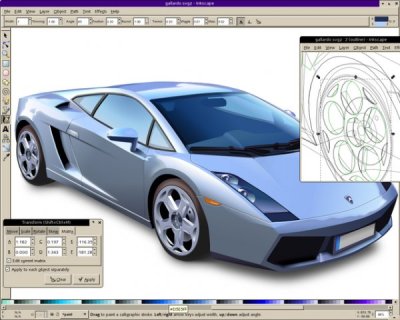
Inkscape is a Open Source vector graphics editor that works with SVG (Scalable Vector Graphics) format, Inkscape works with transparency, gradients, node editing, pattern fills, PNG export, and more. It also runs on Linux, Windows and OSX, those three are officially supported, but also runs in a broad list of Operational Systems. Is a software that I work daily and frequently is featured here in my blog.
You can download Inkscape or directly install it via some package system like Apt:
sudo apt-get install inskcape
But sometimes we need some special feature that is not available yet in the repositories or we want gain speed by having special binaries for our platforms or we want to help developing a new feature. In those cases we need to compile the software by ourself.
Those tips are valid for Ubuntu 8.04 but some part of them can be applied in others distributions. The Inkscape compiled here is the version 0.46+devel so newest versions can have compiling procedures slightly different.
Getting sources via APT.The easiest way to compile Inkscape on Ubuntu is
sudo su
apt-get build-dep inkscape
apt-get source inkscape
cd inkscape
./autogen.sh
./configure
make
make install
This will get a version of inkscape, compile it and install. If the first step doesn’t work well, you can try install all necessary packages by yourself using:
Getting sources via SVN. The recipe I showed above will compile a stable version of Inkscape but not the last version of Inkscape. For that we need to grab the source directly from the Subversion repositories and so compile it.
A alternative way to subversion is getting sources from here. Those are tarballs built every hour after someone change something in the development repositories. Download a tarball, and decompress it on your home folder.
Install all tools we need to compile Inkscape, this should fits:
Enter in the directory with the Inkscape source and do:
./autogen.sh
mkdir build
cd build
../configure
make
sudo make install
In both cases, grabbing sources via svn or via apt, or can set the place where the software will be installed so it not cause conflicts with you already installed version of Inkscape. You can do that replacing the ./configure step with something like:
./configure –prefix=/home/yourname/inkscape
If you had some trouble in one of those steps, consider reading some of those other tutorials:
This is a short tutorial about some JavaFX elements like ellipses, circles, effects and gradients.
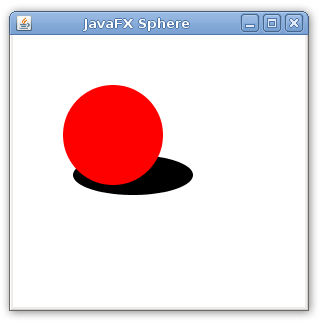
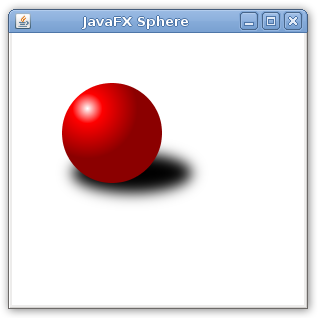
In the first code we are creating a frame with a ellipse with center in (120,140), 60 pixels of horizontal radius, 20 pixels of vertical radius and color black. We have also a circle with center in (100,100), 50 pixels of radius and color red. The idea is make this circle appears like a sphere and make the ellipse look like a shadow.
First lets look at the gradient. It starts with a white color, going to red during the first 30% of the way. The remaining of the way is the color red going to a dark red. It creates a gradient like this one:
But it is a radial gradient, with center in (75,75) and radius 50. So this radial gradient looks like this:
As we place this radial gradient in our circle, it was like this:
And now is like this:
Now the complete code. I guess it’s simple and also concise.
Here is a problem I faced those days while programming with JavaFX.
When you perform a click in a JavaFX area, mouse events are called to all nodes through that position. You can see this behavior in this video.
This is the default behavior. All node are called with a mouse event. Is a expected and robust behavior but sometimes we just don’t want that. We want events called to just one node or a set of nodes.
Example 2.
Is exactly the same code but with blocksMouse: true in the circle node. When blocksMouse is true the mouse event will not be called to others node behind it.
I did this little script to download the last version of JavaFX continuos build and install it for you.
#!/bin/sh
envfile=$HOME/.bash_profile

#download and unpatch the last build of JavaFx
mkdir jfx
cd jfx
wget http://openjfx.java.sun.com/hudson/job/openjfx-compiler/lastBuild/artifact/openjfx-compiler/dist//*zip*/dist.zip
unzip dist.zip
rm dist.zip

#set files at bin folder as executable
chmod +x dist/bin/*

#add those executables to the path
echo "PATH=\$PATH:`pwd`/dist/bin" >> $envfile
Save this script as install_jfx.sh and execute it. Probably you want to execute it at you home directory. If you want to install JavaFX to root change envfile for /root/.bash_profile, if you want to install to all users change for /etc/profile. I tested this script successfully on my Ubuntu 8.04.
After that open a new terminal and try to see if javafx, javafxc and javafxdoc are available. You can test your enviroment with this simple program.
As seen in the Sun Tech Days page, the Sun Tech Days Brazil will happen this September. In a few days we can know exactly the day the event will occurs. Probably we CEJUG will prepare a parallel event and see live the event in São Paulo by video stream. 🙂