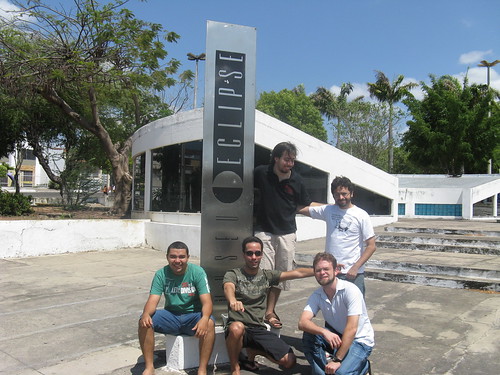
We had our OSUM Pizza Party and it was just great. We had a lot of delicious food and drinks. All paid by SUN OSUM as a prize for we become one of the Century Clubs, firsts communities to have more than 100 members in our OSUM.
Everybody got some gift
A JavaFX application to select random numbers for prizes
Brendan Gregg made an unusual discovery, shouting a HD produces pikes of latency. We’ll see sound proof data centers now? Another point to solid-state drivers.
[youtube]tDacjrSCeq4[/youtube]
I wonder if playing loud music near my computer makes IO slower.
I won a certificate (seems to be really autographed by Jonathan Schwartz *_* I want to believe) that I will frame and put in my room and a $250 dollars check that I’ll save for a trip next year. \o/
Those days I received my box of free Ubuntu CDs and sticks, free of charges. Courtesy of Canonical throught the Ubuntu Shipit project, thanks guys! I love those Internet free stuff. It’s essential having a few CDs distros always with me.
Let sandwich.xml be a file at /tmp directory with the content above.
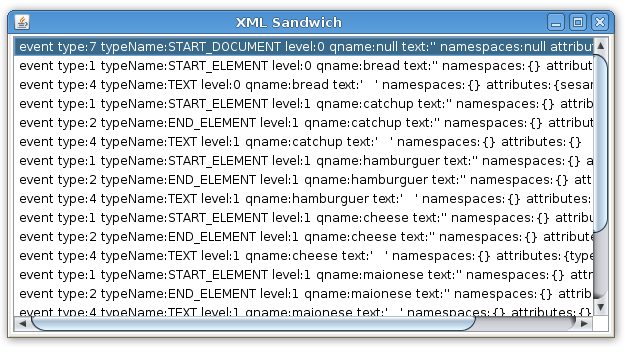
We can open it using java.io.FileInputStream and so use it on a javafx.data.pull.PullParser. A PullParser is a event oriented parser that works with XML and YAML files. Above a general and simple parser with a GUI that show the list of events during the parse process.
import java.io.FileInputStream;
import javafx.data.pull.Event;
import javafx.data.pull.PullParser;
import javafx.ext.swing.SwingList;
import javafx.ext.swing.SwingListItem;
import javafx.scene.Scene;
import javafx.stage.Stage;

var list = SwingList { width: 600 height: 300 }

var myparser = PullParser {
   documentType: PullParser.XML;
   onEvent: function (e: Event) {
      var item = SwingListItem {
         text: "event {e}"
      };
      insert item into list.items;
   }
   input: new FileInputStream("/tmp/sandwich.xml");
}
myparser.parse();

Stage {
   title: "XML Sandwich"
   scene: Scene { content: list }
}
Notice that white spaces like tab and escape characters like new line also produced events from type TEXT. We are not interested on them. Above a parser that looks only those events of type START_ELEMENT or END_ELEMENT, look into it’s contents, building a sandwich at runtime based on the XML file.
import java.io.FileInputStream;
import javafx.data.pull.Event;
import javafx.data.pull.PullParser;
import javafx.data.xml.QName;
import javafx.scene.image.Image;
import javafx.scene.image.ImageView;
import javafx.scene.layout.VBox;
import javafx.scene.Scene;
import javafx.stage.Stage;

// my sandwich starts as an empty VBox
var mysandwich = VBox {}

// give a name and returns a ImageView with a png image like the name
function ingredient(name){
   return ImageView {
      image: Image {
         url: "{__DIR__}{name}.png"
      }
   }
}

// basicaly, look the event and put a ingredient at mysandwich
var myparser = PullParser {
   documentType: PullParser.XML;
   onEvent: function (e: Event) {
      // starter xml elements
      if(e.type == PullParser.START_ELEMENT){
         // bread
         if(e.qname.name.equals("bread")){
             insert ingredient("bread_top") into mysandwich.content;
         }

         // hamburguer
         if(e.qname.name.equals("hamburguer")){
             insert ingredient("hamburguer") into mysandwich.content;
         }

         // catchup
         if(e.qname.name.equals("catchup")){
             insert ingredient("catchup") into mysandwich.content;
         }

         // maionese
         if(e.qname.name.equals("maionese")){
             insert ingredient("maionese") into mysandwich.content;
         }

         // lettuce
         if(e.qname.name.equals("lettuce")){
             insert ingredient("lettuce") into mysandwich.content;
         }

         // cheese
         if(e.qname.name.equals("cheese")){
            var type= e.getAttributeValue(QName{name:"type"});
            if(type.equals("cheedar")){
                 insert ingredient("cheedar") into mysandwich.content;
            } else {
                insert ingredient("cheese") into mysandwich.content;
            }
         }
      }

      // ending xml elements (just bread)
      if(e.type == PullParser.END_ELEMENT){
         if(e.qname.name.equals("bread")){
            insert ingredient("bread_botton") into mysandwich.content;
         }
      }
   }
   input: new FileInputStream("/tmp/sandwich.xml");
}
myparser.parse();

Stage {
   title: "XML Sandwich"
   scene: Scene {
      height: 300
      content: mysandwich
   }
}
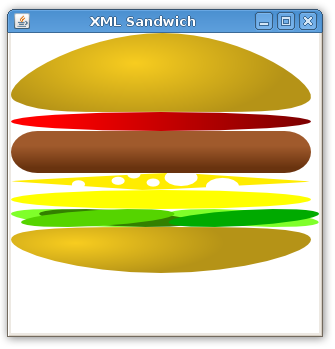
Here’s our sandwich.
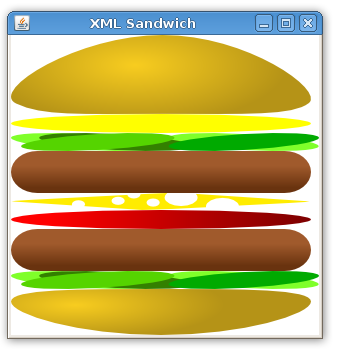
Just changing the XML file you got a new sandwich.
It’s a application to put a Santa’s hat on a picture from web. To test it obviously I used my picture with John Hall “Maddog”, the closest person I know to Santa Claus. ;D
I tried the approach from Chris Campbell’s Effect Playground application but I needed get both photo image and hat at the same time. In this application I used the Jean-Francois Screenshot Maker approach, taking a screenshot of the desired area. Maybe not the best solution, but it works very well. I also used his Screencapture.java and Util.java codes.
package santahat;

import javafx.ext.swing.SwingTextField;
import javafx.scene.CustomNode;
import javafx.scene.input.MouseEvent;
import javafx.scene.image.Image;
import javafx.scene.image.ImageView;
import javafx.scene.layout.VBox;
import javafx.scene.layout.HBox;
import javafx.scene.Node;
import javafx.scene.Scene;
import javafx.stage.Stage;
import javafx.ext.swing.SwingButton;

var imgview = ImageView {
   image: Image {
      url: "{__DIR__}help.png"
   }
}

var txtfield:SwingTextField = SwingTextField {
   columns: 45
   text: "your image url"
   editable: true
   action: function(){
      println(txtfield.text);
      imgview.image = Image {
         url: txtfield.text;
      }
   }
};

var santahat:ImageView = ImageView {
   x: 240 y: -5
   var startX = 0.0
   var startY = 0.0
   var   zoom = 1.0
   var  angle = 0.0

   scaleX: bind zoom
   scaleY: bind zoom
   rotate: bind angle

   onMousePressed: function( e: MouseEvent ):Void {
      startX = e.sceneX - santahat.translateX;
      startY = e.sceneY - santahat.translateY;
   }

   onMouseDragged: function( e: MouseEvent ):Void {
      santahat.translateX = e.sceneX - startX;
      santahat.translateY = e.sceneY - startY;
   }

   onMouseWheelMoved: function( e: MouseEvent ):Void {
      if(e.controlDown) {
         angle +=
         e.wheelRotation * 10;
      } else {
         zoom +=
         e.wheelRotation / 20;
      }
   }

   image: Image {
      url: "{__DIR__}santahat.png"
   }
}

// Based on the Jean's ScreenshotMaker
// http://javafx.com/samples/ScreenshotMaker/index.html
var stage:Stage = Stage {
   title: "Santa Hat"
   width: 510 height: 480
   scene: Scene {
      content: [
         VBox {
            content: [ txtfield, imgview,
               SwingButton {
                  text: "Save"
                  action: function() {
                     // Ugly. See the entire source at through the link in the blog post
                  }
               }]
         }, santahat]
   }
}
Gravatar is easy way to put global recognized avatar images into any Internet application. Gravatar would stands for globally recognized avatar.
Below, the Java class that I got from the Gravatar Java reference. Here is a static class called md5 that applies a MD5Sum algorithm over a string. Is a little complex code but all behavior keeps encapsulated and who uses it don’t need to know how it works. Just gives a string and receives a encrypted string. Those two codes are also a good example of how calling Java classes inside a JavaFX code.
package gravatarexample;

import java.security.MessageDigest;
import java.io.UnsupportedEncodingException;
import java.security.NoSuchAlgorithmException;

public class MD5 {
   public static String toHex(String message) {
      try {
         MessageDigest md = MessageDigest.getInstance("MD5");
         byte array[] = md.digest(message.getBytes("CP1252"));
         StringBuffer sb = new StringBuffer();
         for (int i = 0; i < array.length; ++i) {
            sb.append(Integer.toHexString((array[i]&0xFF)|0x100).substring(1, 3));
         }
         return sb.toString();
      } catch (NoSuchAlgorithmException e) {
      } catch (UnsupportedEncodingException e) {
      }
      return null;
   }
}
As a Java class in the same package, any JavaFX (or Java) code can call it without any problem. Just to keep the code more clear I’m importing it explicitly. Is this example I also create some Swing interface to give user the option to put his mail, adjust the image size and get a output direct link or html image tag.
The string itself is assembled in the gravatalize function. You give a mail and it’s returns a Gravatar direct link to the image. There’s many cool ways to use together Gravatar and a JavaFX Internet application.


 Some prizes